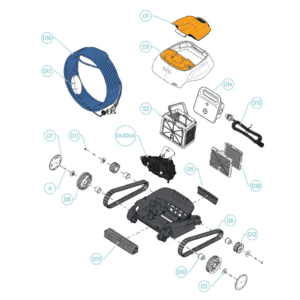
Spare parts list

Maytronics Dolphin Ex 10 orange filter cover assembly - 99952355-ASSY
2,95 €
Maytronics Dolphin Cainan 1 combined filter basket S1 - 9991465-ASSY
77,95 €
Maytronics Dolphin Ex 10 exterior casing - 99952130-DIY
27,95 €

Maytronics Dolphin Cainan 1 S1 motor unit with wall climbing - 9995386-EX
252,45 €
Maytronics Dolphin Cainan 1 quick water discharge valve - 9983024
2,95 €
Maytronics Dolphin Cainan 1 drive track short grey - 9983152
14,45 €
Maytronics Dolphin Ex 10 large wheel cover white S1 - M96100011
2,45 €
Maytronics Dolphin Ex 10 front wheel white - 99834101
6,45 €
Maytronics Dolphin Ex 10 white wheel cover S1/S2 - M96200033
0,45 €
Maytronics Dolphin Cainan 1 wheel hub bushing - 9983114
0,45 €
Maytronics Dolphin Ex 10 wheel plug white S1 - M96100021
0,45 €
Maytronics Dolphin Ex 10 small wheel white - 9983015
2,95 €
Maytronics Dolphin Cainan 1 active brush assembly S1 grey - 9995544-ASSY
36,95 €

Maytronics Dolphin digital basic power supply unit 120W 230V (ON/OFF) - 99956032-ASSY
249,00 €

Maytronics Dolphin C6 power supply mains cable 230V EU plug - 58984401LF
19,95 €

Maytronics Dolphin Cainan 1 blue communication cable 15 m 2-wire (no swivel) - 9995884-DIY
100,45 €
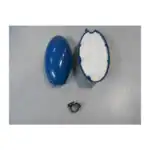
Maytronics - Dolphin Pool Up CB blue cable float assembly (basic) - 99960081
11,98 €
Maytronics Dolphin Cainan 1 ultra-fine filter panels front and rear (S1, pair) - 9991469-ASSY
41,95 €
Maytronics Dolphin C6 screw KA50×16 WN1412 - 3379616-A
0,45 €

Description
Maytronics Dolphin Ex 10 exploded view & spare parts
The Maytronics Dolphin Ex 10 is a compact, plug-and-play robotic pool cleaner built for above-ground pools, delivering a thorough floor clean in as little as 1.5 hours with active brushing, CleverClean navigation, and a top-access filtration system. Like every machine that works this hard, it has wear items that need periodic attention. This exploded-view diagram page gives you a numbered breakdown of every component inside the Ex 10 so you can identify exactly the part you need and order a genuine Maytronics replacement with confidence — no guesswork, no incompatible generic substitutes.
How to use the exploded-view diagram to find your part
Each component in the diagram is assigned a unique reference number that matches the part numbers listed in the table below the illustration. To identify a failed or worn part, locate it visually on the diagram — working from the outer shell inward — and note its reference number. Use that number to search or filter the parts listed on this page, then add the correct item to your cart. If your Ex 10 is showing a specific fault (reduced suction, a wobbly track, a cracked filter housing), focus on the relevant section of the diagram: drive system at the base, filtration in the upper chamber, and electronics in the rear bay. Matching diagram number to part number is the fastest way to ensure you receive the precise component engineered for your robot.
Main replaceable parts on the Dolphin Ex 10
The Ex 10 is built around a handful of key assemblies, all of which are available as individual spare parts here. The rubber tracks wrap around the drive wheels and grip the pool floor to propel the robot across every surface. The brushes (the active brushing unit that spins at twice the robot’s travel speed) scrub dirt, algae, and fine debris loose so the filtration system can capture it. The filter panels and filter bags sit inside the top-access canister and trap everything from fine dust to larger debris. The impeller sits within the motor unit and generates the suction that draws water — and everything suspended in it — through the filter. The floating cable (40 ft on the standard Ex 10 configuration) carries power from the power supply unit down to the robot while staying clear of the drive tracks. The handle lets you lift the robot safely out of the pool without trailing water through the house, and the caddy provides a purpose-built storage and transport trolley that keeps the cable neatly wound between sessions.
Common wear items and when to replace them
Tracks and brushes are the hardest-working parts of the Ex 10 and typically show wear first. Inspect the rubber tracks each season for cracking, stretching, or loss of grip — a slipping track will leave patches of the pool floor uncleaned and put extra strain on the motor. Brushes should be checked for flattened or missing bristles; a worn brush can no longer dislodge algae effectively, which means the robot may appear to be running normally while your water quality quietly deteriorates. Filter panels and bags need rinsing after every cleaning cycle and should be replaced when they become permanently discoloured, torn, or noticeably restrict flow. The impeller is prone to jamming if hair or string enters the intake; if suction drops suddenly and the tracks and filter are fine, the impeller is the next place to investigate. The floating cable and power supply should be inspected for cracking, kinking, or corrosion at the connectors — a damaged cable is both a performance and safety concern and should be replaced immediately rather than repaired with tape.
Why genuine Maytronics parts matter for your Ex 10
Maytronics designs every component of the Dolphin range to work as an integrated system — motor voltage, impeller diameter, brush rotation speed, and filter pore size are all matched to each other. Fitting a non-genuine track or brush can alter the balance of the robot, causing it to navigate erratically or wear the drive wheels unevenly. A third-party power supply may not deliver the correct output voltage (24 V DC for the motor unit) or meet the IP54 weather-resistance rating of the original, creating a potential safety hazard outdoors. Genuine spare parts also preserve your warranty coverage and ensure that CleverClean navigation behaves as Maytronics intended. Every part listed on this page is an authentic Maytronics component sourced through official channels, so you can maintain your Ex 10 to factory specification for the full life of the robot.
Storing and maintaining your Ex 10 between seasons
Good maintenance habits extend the life of every spare part significantly. After each cleaning cycle, remove the robot from the pool, open the top-access filter canister, and rinse the filter panel or bag with fresh water before reinserting it. Wind the floating cable loosely onto the caddy rather than pulling it tight, which can cause internal wire fatigue over time. Store the robot in a cool, shaded spot — direct sunlight accelerates rubber degradation in the tracks and brushes. At the end of the swimming season, give the entire unit a thorough rinse with tap water to remove mineral deposits and chlorine residue from the motor bay, cable connectors, and brush housing. A quick seasonal inspection against the exploded-view diagram will show you which parts are approaching end-of-life so you can order replacements over winter and have your Ex 10 ready to drop straight back into the pool come spring.